What
is Master Data?
Master data in SAP is used as a base
for any transaction. If you are producing, transferring stock, selling,
purchasing, doing physical inventory, whatever your activity may be , it requires
certain master data to be maintained. We have material master data, customer
master data, vendor master data, pricing/conditions master data, warehouse
management master data (storage bin master data) etc.
The ones we will focus in MM module
are material master and purchase info record.
Material
Master: What you should know about material master?
Material in SAP is a logical
representation of certain goods or service that is an object of production,
sales, purchasing, inventory management etc. It can be a car, a car part,
gasoline, transportation service or consulting service, for example.
InInIn All the information for all
materials on their potential use and characteristics in SAP are called material
master. This is considered to be the most important master data in SAP (there
are also customer master data, vendor master data, conditions/pricing master
data etc), and all the processing of the materials are influenced by material
master. That is why it's crucial to have a precise and well maintained material
master.
In order to be confident in your
actions you need to understand material master views and its implications on
processes in other modules, business transactions and a few more helpful
information like tables that store material master data, transactions for mass
material maintenance (for changing certain characteristics for a large number
of materials at once).
Material types
In SAP ERP, every material has a
characteristic called "material type" which is used throughout
the system for various purposes.
Why
is it essential to differentiate between material types and what does that
characteristic represent?
- It can represent a type of origin and usage – like a finished product (produced goods ready for sale), semifinished product (used as a part of a finished product), trading goods (for resale), raw materials (used for production of semifinished and finished products) etc. These are some of the predefined SAP material types among others like food, beverages, service and many others.
- We can define our custom material types if any of standard ones doesn’t fulfill our need.

Most
used material types in standard SAP installation
What
can be configured on material type level (possible differences between types)?
- Material master views: It defines the views associated with a Material Type. For example, if we have a material type "FERT" assigned to our material Product 1000 – we don't want to have Purchasing based views for that material because we don't need to purchase our own product – it is configured on material type level.
- Default price control: we can set this control to standard or moving average price (covered later in detail), but this can be changed in material master to override the default settings.
- Default Item category group: used to determine item category in sales documents. It can be changed in material master to override the default settings.
- internal/external purchase orders, special material types indicators, and few more.

Offered
material types in MM01 transaction
So
material type is assigned to materials that have the same basic settings for
material master views, price control, item category group and few other.
Material Type can be assigned during the creation of the material in t-code
MM01 (covered in detail later)
Where
can we find a complete list of materials with their respective material type?
There are numerous transactions for
this. The raw data itself is stored in MARA table
(you can view table contents with
t-code SE16 or SE16N – newest version of the transaction), but in some systems
these t-codes aren't allowed for a standard user. In such cases, we can easily
acquire the list with t-code MM60 (Material list). MM60 is used particularly
often as it displays a lot of basic material characteristics.
Selection screen – you can enter only
the material number:
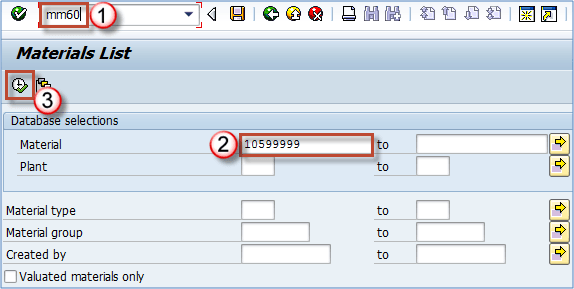
Selection screen for MM60 transactio
We can see
that material 10410446 in plant AR01 is of type FERT (finished product).

MM60 report results with the export button highlighted
Using the
toolbar button highlighted on screen, we can export the list of materials we
have selected on screen.
Material group
Another
characteristic SAP material is assigned during it's creation is "material
group", which can represent a group or subgroup of materials based on
certain criteria.
Which criteria can be used to create material groups?
Any criteria
that suit your needs for reporting purposes is right for your system. You may
group materials by the type of raw material used to produce it (different kinds
of plastics used in the production process), or you can divide all services
into consulting services (with different materials for SAP consulting, IT
consulting, financial consulting etc), transportation services (internal
transport, international transport), you can also group by production technique
(materials created by welding, materials created by extrusion, materials
created by injection etc). Grouping depends mainly on the approach your
management chooses as appropriate, and it's mainly done during the
implementation, rarely changes in a productive environment.

Assigned material group in material master
In addition,
there is a material hierarchy (used mostly in sales & distribution) that
can also be used for grouping, but it's defined almost always according to
sales needs as it is used for defining sales conditions (standard discounts for
customers, additional discounts, special offers).
On the other
hand, material group is mainly used in PP and MM module.
If you need
to display material groups for multiple materials, you can use already
mentioned t-code MM60. You just need to select more materials in selection
criteria.

Material group in report MM60
Material
group is easily subject to mass maintenance via transaction MM17. More on that
in the material master editing section.

No comments:
Post a Comment
Note: only a member of this blog may post a comment.